The Philosophical Developer — Chapter 16: Deploy to the Local Cloud
2026-07-09 · 3 min read
Deploy to the Local Cloud
All code for this series lives in the local-cloud repo on GitHub.
We’ve spent four chapters building the foundation: a local cloud environment with Floci, k3s, TDD infrastructure modules, and an automated CI/CD pipeline. Now we deploy.
The Kubernetes Module
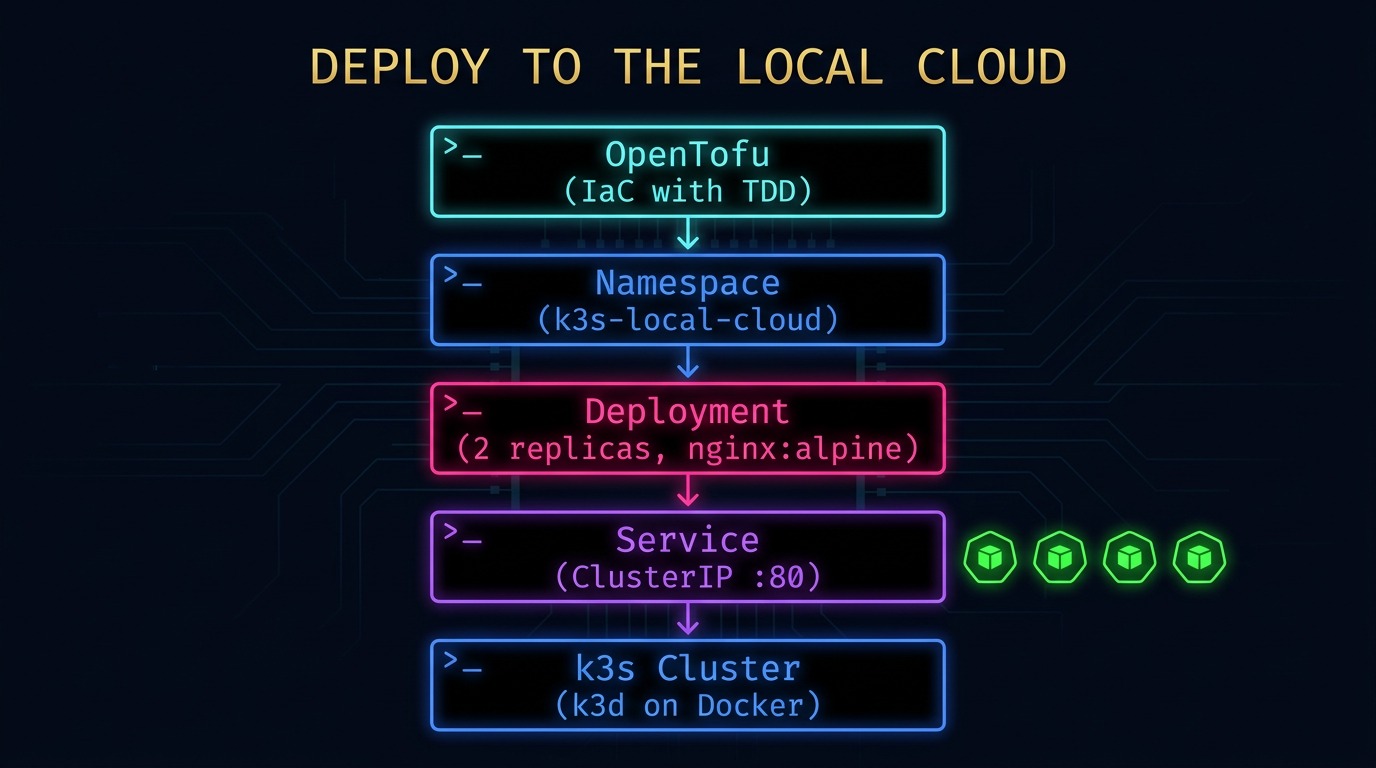
The k8s module creates three resources:
- Namespace — isolates the local-cloud workloads
- Deployment — runs the application with configurable replicas
- Service — exposes the deployment as a ClusterIP
TDD First
Following the same pattern as every module before it, we wrote the test first:
run "namespace_created" {
  command = plan

  assert {
    condition     = output.namespace == "local-cloud"
    error_message = "Expected namespace 'local-cloud'"
  }
}

run "deployment_created" {
  command = plan

  variables {
    app_name = "hello-local-cloud"
    replicas = 2
  }

  assert {
    condition     = output.deployment_name == "hello-local-cloud"
    error_message = "Expected deployment name 'hello-local-cloud'"
  }
}
The test validates the module’s contract without touching the cluster. Plan mode is idempotent — no side effects, no cleanup needed.
Wiring It In
The environment’s main.tf wires the k8s module alongside the existing AWS modules:
provider "kubernetes" {
  config_path = "~/.kube/config"
}

module "k8s" {
  source = "../../modules/k8s"

  app_name  = "hello-local-cloud"
  app_image = "nginx:alpine"
  app_port  = 80
  replicas  = 2
}
The kubernetes provider connects to the local k3s cluster via the kubeconfig that k3d generated when we created the cluster. No cloud credentials, no network latency.
Running the Pipeline
The pipeline validates the k8s module just like every other module:
tofu test
k8s.tftest.hcl... pass
  run "namespace_created"... pass
  run "deployment_created"... pass
  run "service_created"... pass

Success! 3 passed, 0 failed.
Applying to the Cluster
With tests passing, we apply the configuration:
tofu apply -auto-approve
This creates:
- The
local-cloudnamespace - A deployment with 2 replicas of
nginx:alpine - A ClusterIP service on port 80
Verifying
kubectl get ns local-cloud
kubectl -n local-cloud get pods
kubectl -n local-cloud get svc
What This Proves
The local cloud is now a complete development platform:
- Storage — S3-compatible via Floci
- Compute — ECS via Floci, Kubernetes via k3s
- Networking — VPC simulation via OpenTofu
- IAM — Identity simulation via OpenTofu
- CI/CD — Automated pipeline via Dagger + GitHub Actions
- Deployment — Kubernetes workloads via OpenTofu
Everything runs on a single machine. Everything is validated by the pipeline. Everything is reproducible from scratch.
The Local Cloud Pattern
┌─────────────────────────────────────────────┐
│              Local Cloud                    │
│  ┌─────────┐  ┌──────────┐  ┌───────────┐  │
│  │  Floci   │  │   k3s    │  │ Registry  │  │
│  │ (AWS)    │  │ (k8s)    │  │ (Docker)  │  │
│  └────┬─────┘  └────┬─────┘  └─────┬─────┘  │
│       │              │              │        │
│  ┌────┴──────────────┴──────────────┴────┐   │
│  │       OpenTofu (Infrastructure)       │   │
│  └────────────────┬──────────────────────┘   │
│                   │                          │
│  ┌────────────────┴──────────────────────┐   │
│  │     Dagger Pipeline (CI/CD)           │   │
│  └───────────────────────────────────────┘   │
└─────────────────────────────────────────────┘
Next
The pipeline validated. The deployment applied. The cluster is running. But how do we know it’s healthy? How do we see what’s happening inside?
The next chapter adds observability — Prometheus for metrics, Grafana for dashboards, and a monitoring module to keep the local cloud visible.
Also on LinkedIn.