The Philosophical Developer — Chapter 57: A Panel That Shows You the Plan Before You Click
2026-10-08 · 7 min read
The AI lab has a small diamond on my top bar. Click it and a panel drops down with every model server and web app on the box, what is running, and a way to switch it. In Chapter 56 it was a footnote: the bar plugin polls ai-lab status --json and toggles things. This week it stopped being a footnote, because it broke in the most visible way a UI can break. The buttons ran off the edge of the card.
This chapter is about the rules that rebuilt it, and about the bugs I only found by driving the real bar with a synthetic mouse.
The day the chips ran out of room
The lab’s model server, Strata, used to come in three variants: the RTX 5090, the 4070 Ti, or both cards. The widget showed one chip per variant on a single row, and that was fine at three. Then the 5090 grew two more context sizes (524K and 1M tokens), the Coder model moved onto the 4070 Ti beside it, and the row needed six chips in a 360-pixel card.
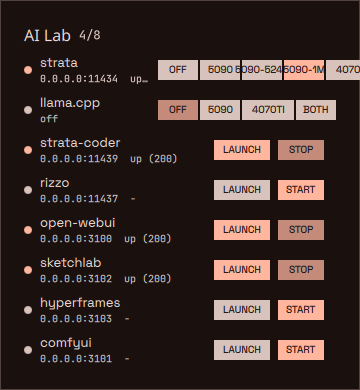
That is the old code, rendered today from git history against a real lab state. “5090-524” collides with “5090-1M”, “4070” is cut in half, and a chip called BOTH is somewhere past the right edge. The status lines read 0.0.0.0:11434 up (200), which is accurate and tells you nothing you would want to know at a glance.
The deeper problem was not width. One row was trying to answer three different questions at once: which card, how much context, and is the Coder running. Those are three decisions. They needed three rows.
The rules
I wrote these down before touching QML, because a widget without rules grows one special case per feature until it looks like the screenshot above.
One labelled row per decision. CARD, CONTEXT, CODER, LLAMA. Each row has a label column and a segmented control. You never have to work out which chip belongs to which question.
Segments share the row. The control divides whatever width is left after the label equally among its options. Add an option and every segment gets narrower; nothing gets pushed off the card. Service rows follow the same idea: OPEN and START/STOP are anchored to the right edge, and the text column elides instead of shoving them out.
Show the consequence before the click. This is the one I care about most. The lab has a GPU arbiter (scripts/gpu-arbiter.py) that decides what has to stop or move when you start something: Strata owns its card, the Coder owns the 4070 Ti, ComfyUI moves to whichever card is free. Those rules are correct and completely invisible. So hovering any choice runs the same command with --dry-run and prints the plan in gold under the controls.
Plain words for state. ready, loading, starting, stopped. up (200) belongs in the CLI.
A choice should mean one thing. Picking a card keeps the context you already have. Picking a context applies to the card Strata is on. When the arbiter has to move Strata to the other card, it keeps the context too: a 1M session on the 5090 becomes a 1M session on the 4070 Ti, not a quiet downgrade to 256K.
What it looks like now
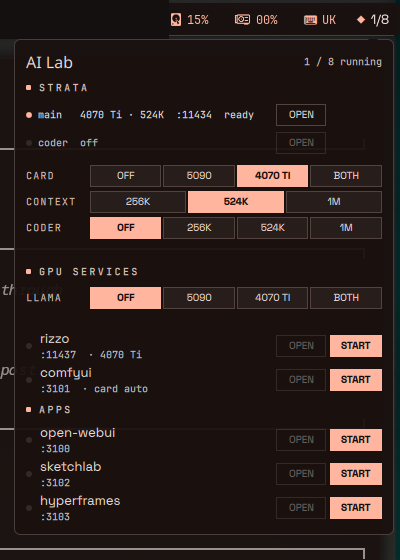
As of today the 4070 Ti and the Coder get the same three context sizes the 5090 has, so the CONTEXT row follows whichever card Strata is on, and CODER became OFF | 256K | 524K | 1M instead of an on/off switch. The rows did not change shape to absorb that. That was the point of the rules.
Three states, rendered from fixtures. A duo session (the 5090 at 1M plus the Coder at 1M). Strata alone on the 4070 Ti at 524K, with ComfyUI moved to the free 5090. And the Coder still loading beside a 524K main model:
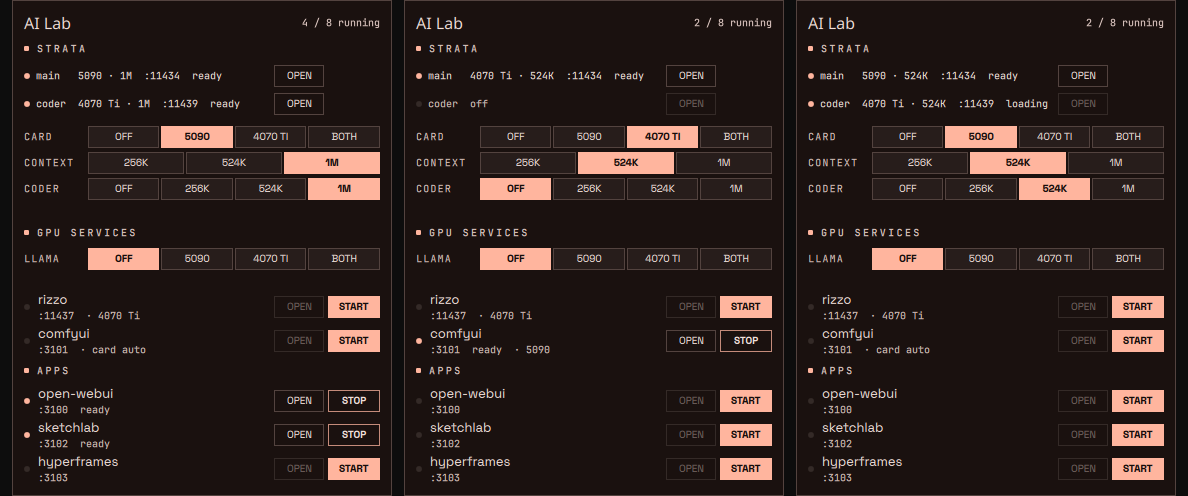
And the previews, from the real bar. On the left I am hovering CONTEXT 1M while Strata runs on the 4070 Ti at 524K. On the right, hovering the Coder at 524K: the plan says Strata has to leave the 4070 Ti, and it lands on the 5090 at the same 524K.
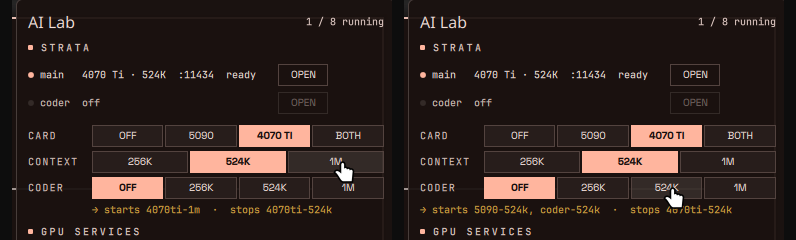
The preview text is the arbiter’s own plan, not a second copy of the rules in QML. The planner is a pure function over the registry and the set of running services, with 62 test cases behind it, and the CLI, the dry-run and the click all go through it. If the widget ever disagrees with the CLI, one of them is calling the wrong command, and that is a one-line bug instead of a logic fork.
How I test a top bar
Two loops, and today proved I need both.
The first is a harness: a tiny Quickshell file that loads the plugin straight from the repo, feeds it a fixture through a fake ai-lab that returns canned status --json, renders the card offscreen and saves a PNG. Five or six states take a few seconds, and the QML log gets grepped for warnings on every run. It caught the obvious things. “loading model” did not fit on the Coder’s status line once the line also carried a context size, so in those lines it became “loading”.
The second loop is the real bar. hyprctl moves the cursor, wlrctl clicks the diamond, grim captures the panel, and I read the screenshot back. That loop caught three bugs the harness could not, because the harness never moves a mouse:
- The longer variant names made the preview elide (
stops strata-4070…). The preview now drops the redundantstrata-prefix, and when a plan is still too long, it borrows the label column instead of cutting off. - Hovering the CODER row showed nothing at all. The handler referred to a property declared on the control instance, and it never resolved. No error in the log, no preview, just silence. It is an explicit property on the panel now.
- Moving the pointer straight from one row to another sometimes blanked the preview. The old row’s “pointer left” event can arrive after the new row’s “pointer entered”, and the old row was clearing a preview that no longer belonged to it. Now each row can only clear its own.
The last one existed before this week’s changes. I had never seen it because I had never moved the pointer between rows fast enough while watching for it. A synthetic cursor moves fast and does not get bored.
The honest bit
The harness renders state, not interaction. Every bug in the second list would have shipped if I had stopped at clean fixtures and an empty warning log. The UI is only verified once something clicks the real thing.
The rules also cost something. Fixed-height preview lines, a label column, segmented rows: the panel is taller than the old chip strip, and on a small laptop screen it would want a scroll. On this machine it fits. I would rather scroll than guess what a click does.
And the previews are only as good as the arbiter. They make its decisions visible, and that is exactly how I noticed it used to drop a 1M session to 256K when it moved Strata between cards. Visible rules get fixed. Invisible ones get worked around.
The series: The Philosophical Developer — real experiments, real code, real outcomes. Previous: Chapter 56: The Lab Gets A Control Plane. Earlier in this arc: Chapter 55: The Model That Outruns My Reading Speed, Ryoku: The Arch/Hyprland OS I Almost Skipped.
Repo:
- ai-lab-quadlets —
plugin/ailabis the widget;scripts/gpu-arbiter.pyis the planner behind every preview